
Mobile Anesthesia
A practical guide to choosing an EHR for a mobile anesthesia practice
A mobile anesthesia practice does not run from one front desk. Its software has to keep schedules, patient information, staff, supplies, and records organized while the team moves between facilities.
The best anesthesia EHR for a small mobile group is not simply the one with the longest feature list. It is the one that makes a changing workday easier to see, coordinate, and document without forcing the team to rebuild the same information in several systems.
Start with the movement of a real workday
Mobile anesthesia adds an operational layer that a fixed-location practice does not have. Clinicians may work with different facilities, schedules, contacts, and supply needs in the same week. Before comparing software, map one case from the first request through the completed record.
Write down where the team currently has to:
- re-enter a patient or facility detail;
- call or text someone to confirm information already sent elsewhere;
- check a separate calendar for a provider or location;
- update a paper, spreadsheet, or second application after the case; and
- discover too late that a supply needs to be reordered.
Those handoffs are the real requirements for anesthesia practice management software. A polished demonstration matters less than whether the system removes those repeated steps.
1. Make multi-location scheduling easy to scan
A mobile team needs to answer three questions quickly: who is assigned, where are they going, and when must they be there? Look for a calendar that can be filtered by provider and location and that keeps the patient schedule visible without maintaining a separate staffing spreadsheet.
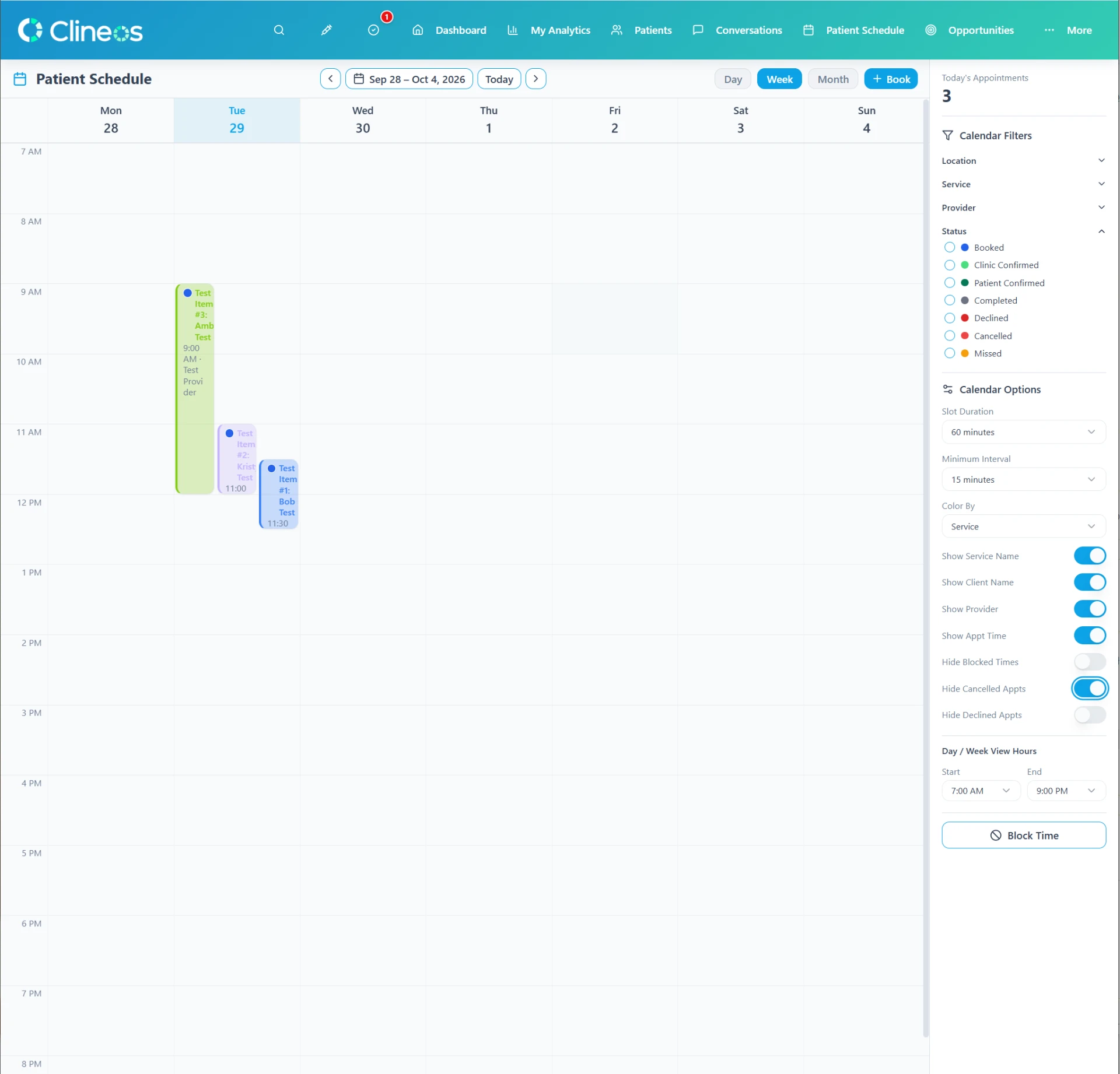
During a software review, ask the vendor to complete a realistic change: move a case, reassign the provider, and show how the people affected would find the updated information. That test reveals more than a static calendar.
2. Connect intake, records, and communication
Intake forms, patient charts, phone calls, texts, and email should support one continuous workflow. When those tools are disconnected, the team can lose time matching a message to a patient or determining whether requested information arrived.
Evaluate how the system handles a new request, sends the appropriate form, records communication, and gives the clinical team the information it needs. Also decide which channels your practice permits and how patient communication preferences will be recorded.
3. Treat supplies and controlled-substance records as separate tests
General supplies and controlled substances may both travel with the team, but they do not carry the same recordkeeping responsibilities. For routine supplies, test whether staff can see what is low and record a reorder before the next facility day. For controlled substances, have a qualified compliance advisor evaluate the record fields, access controls, inventory workflow, and retention process against every rule that applies to your practice.
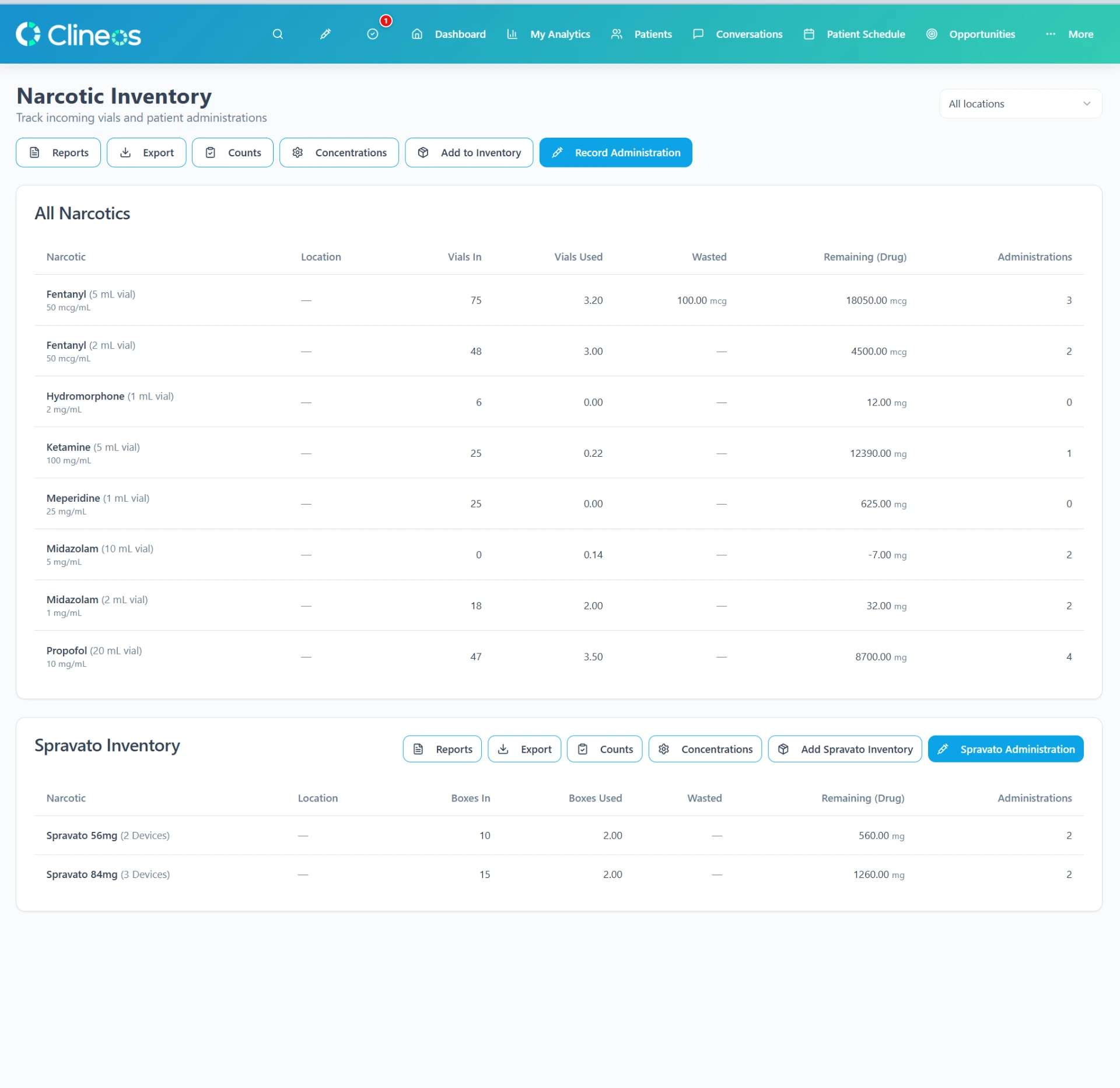
Federal DEA rules in 21 CFR Part 1304 address controlled-substance records and reports, including record availability and retention. State rules and the circumstances of transport, storage, administration, and disposal may add requirements. Do not accept a generic “compliant” badge as the answer.
4. Include staff time and facility relationships
Small mobile groups often have the same person coordinating facilities, staffing, and patient details. A connected system can make those roles easier by keeping facility opportunities, staff availability, schedules, and time records in the same operational picture.
A CRM can also help track a prospective facility relationship from the first conversation to an active working relationship. That is different from the patient chart, and the system should make the distinction clear.
A seven-question evaluation checklist
- Can we see provider, location, and patient schedules together?
- Can we build and send our own intake forms?
- Do patient calls, texts, and emails stay connected to the right record?
- Can staff record time while working across locations?
- Can we track routine supplies and reorder needs?
- Can our advisors validate the controlled-substance workflow?
- What happens to our workday if the system or internet is unavailable?
Ask every vendor to demonstrate these tasks using your real sequence of work, not an idealized sample. Then compare how many handoffs remain.
Clineos brings these operational areas together for independent practices. Explore the full feature set or schedule a conversation about your mobile workflow.
Sources and further reading
- HHS: Summary of the HIPAA Security Rule
- HHS: Business Associate Contracts
- DEA: 21 CFR Part 1304 — Records and Reports of Registrants
This article is for general educational purposes and is not medical, legal, billing, or compliance advice. Requirements vary by practice, payer, state, and circumstance. Confirm obligations with qualified advisors and the agencies that govern your work.